In freight, the first credible quote often wins. Yet for most forwarders the quote desk still lives in the inbox. Requests arrive as free-text emails, spreadsheets and forwarded threads. Each one has to be read, priced from several sources, checked and answered. When volume spikes or a request lands after hours, customers wait, and many book with whoever answered first.
Freight RFQ automation closes that gap. It is less about saving keystrokes than about winning more business.
Win more business
Faster, more complete quoting moves revenue in four ways:
- Every request gets an answer. Requests that used to wait overnight or get lost in a busy inbox are priced and sent.
- Speed wins deals. A quote that arrives in minutes reaches the customer before the competition.
- Reps quote more. With routine requests handled, each pricing rep covers more volume and spends their time on tenders, strategic accounts and negotiation.
- Open quotes get followed up. Unanswered quotes are chased systematically, and every win or loss is recorded with its reason.
Step one: turn the email into a structured request
The first job of an AI quoting worker is reading. It extracts every field a price depends on and flags what is missing.
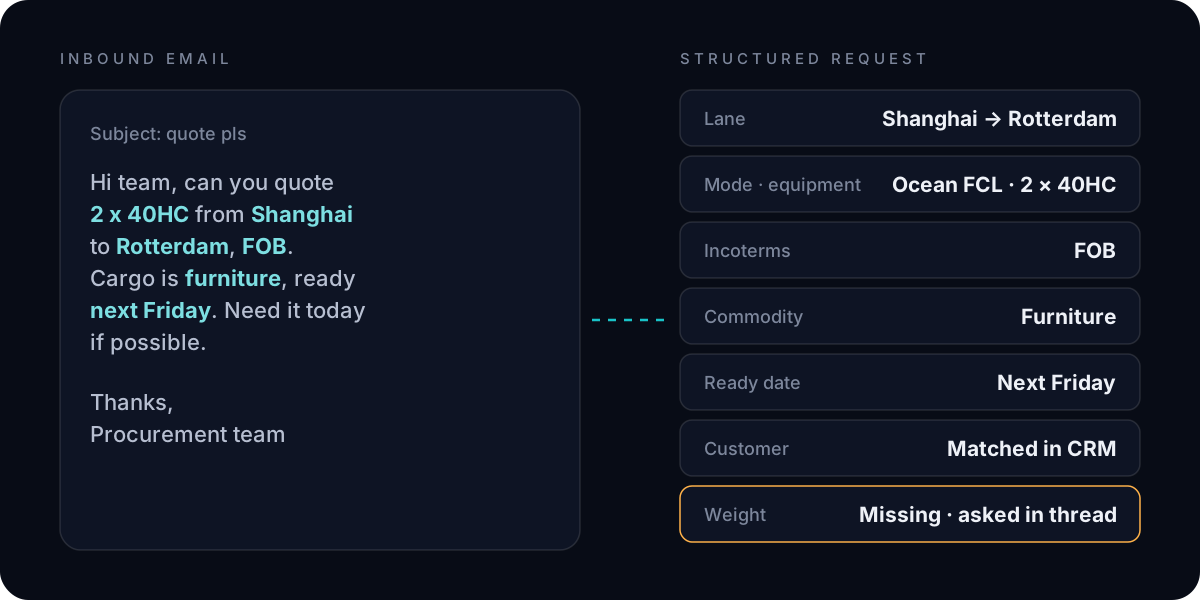
| Field | Why it matters |
|---|---|
| Lane (origin and destination) | Selects the tariff and the carriers |
| Mode and equipment | Ocean FCL or LCL, air, road; container type and count |
| Incoterms | Decides which legs and charges are in the quote |
| Commodity | Surcharges, restrictions, dangerous goods review |
| Ready date | Validity, schedules and capacity |
| Customer | Contract rates, discounts and payment terms |
When a field is missing, the AI asks for it in the same thread rather than guessing.
Step two: price, check, approve, send
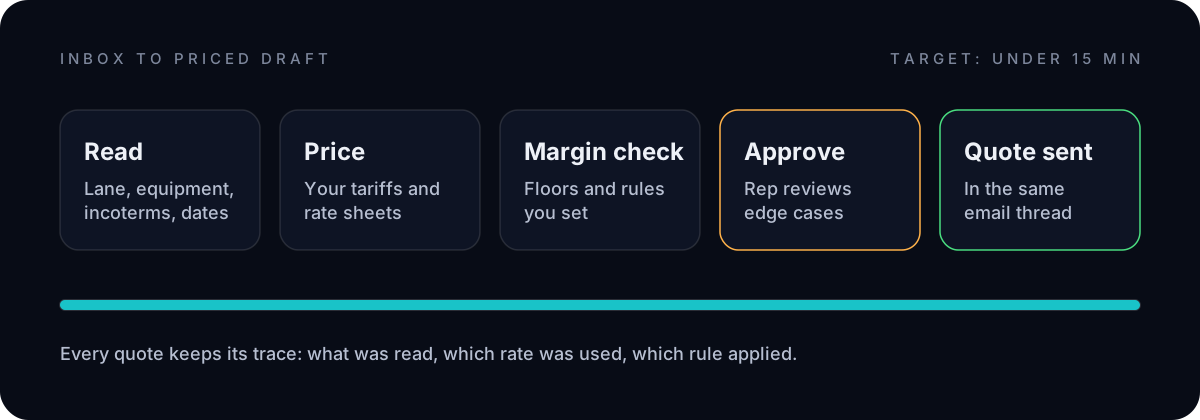
- Price against your own tariffs, rate sheets and pricing engine.
- Check margin against the floors and rules you set for the customer and lane.
- Approve only what needs a person: low confidence, unusual cargo, strategic accounts.
- Send the quote in the original email thread and log it in your TMS or CRM.
Every quote keeps its trace: what was read, which rate was used and which rule applied.
A sales pipeline you can actually manage
Today, many quotes live in individual inboxes and personal spreadsheets. Nobody knows how many requests came in this week, which are still open or why a lane keeps losing.
With RFQ automation, every request becomes a pipeline item, simple and clear:
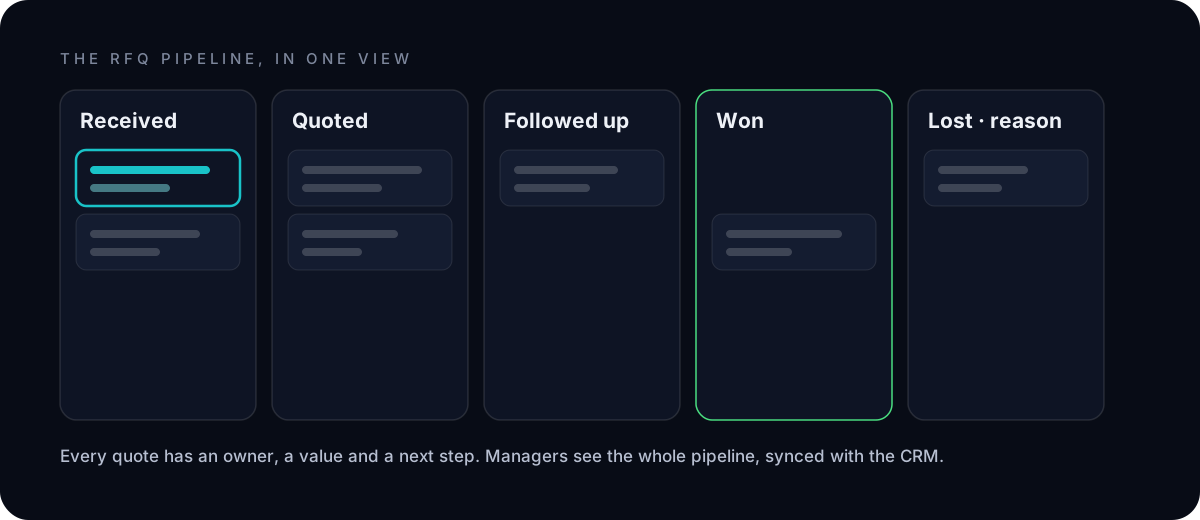
- One view of every quote, from received to won or lost, synced with the CRM.
- An owner, a value and a next step for each one, so nothing falls through the cracks.
- Win and loss reasons recorded, so managers see which lanes, customers and prices convert.
- Control without micromanagement: managers set the rules and thresholds, and see exactly where people stepped in.
Customers notice the difference
For the customer, the change is simple: they ask, and they get a fast, accurate, professional answer, every time. Quotes are consistent in format and content, follow-ups arrive on time, and missing information is requested clearly in the same thread. That responsiveness builds trust, and trust brings the next request back to you.
How to start
- Pick one segment with steady volume, such as a mode, a lane cluster or a branch.
- Connect the inbox, the rate sources and the CRM where quotes are tracked.
- Write down the margin rules and approval thresholds that today live in people's heads.
- Run supervised: every quote reviewed until accuracy is proven, then let routine quotes flow.
- Measure response time, quotes per rep, conversion to bookings and customer feedback.
Exworks' Quoting Desk does this on top of your existing tariffs, rate sheets, TMS and CRM, with a target of under 15 minutes from inbox to priced draft. The first workflow is typically in production within 45 days.